

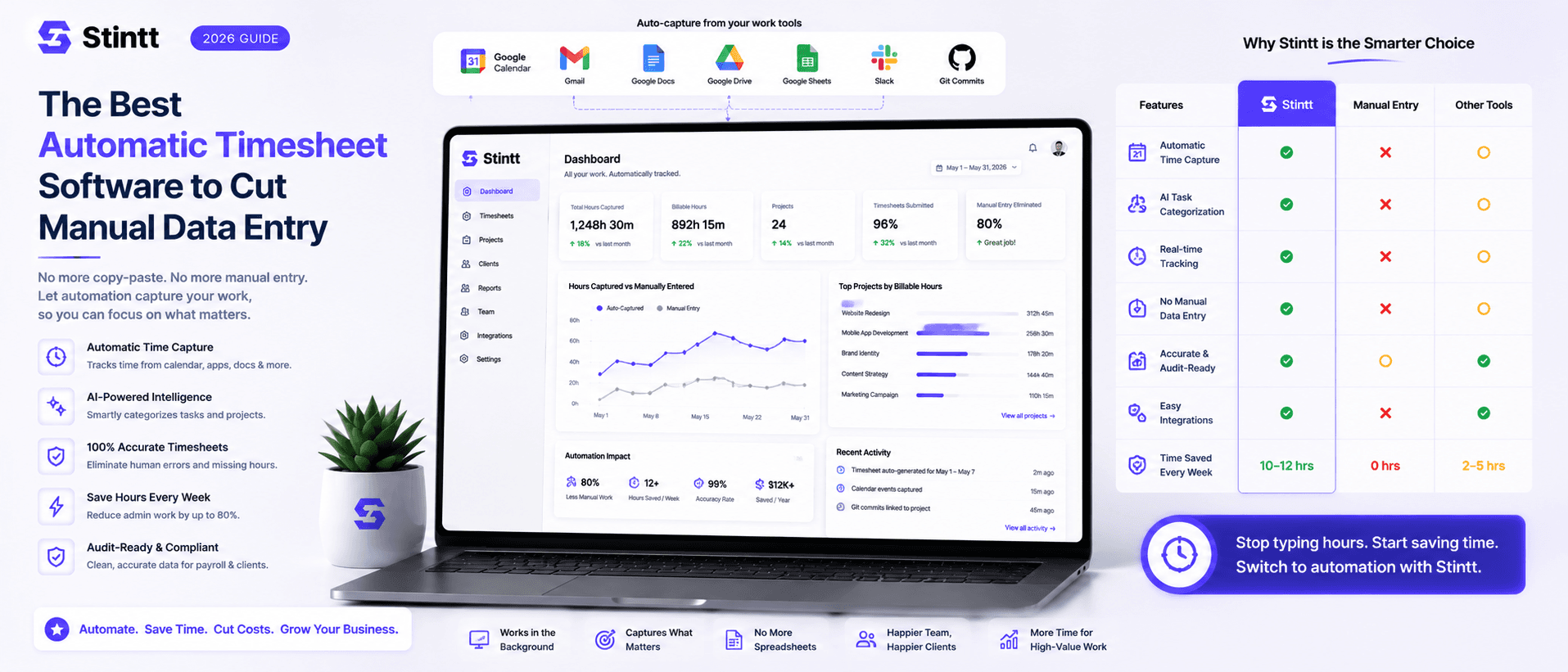
The Best Automatic Timesheet Software to Cut Manual Data Entry
The best automatic timesheet software is simply the one that builds timesheets from a record your team already keeps. But "automatic" means three different things — timer-based, activity-based, and calendar-based tools all claim it, and picking the wrong category is how teams end up paying for a tracker nobody opens after week two. This guide breaks down the three, gives you five questions that separate real automation from shelfware, places the well-known names (Harvest, Toggl, Clockify, Memtime), and is honest about when a calendar-based tool is the wrong pick.
The Best Automatic Timesheet Software to Cut Manual Data Entry
The short answer: the best automatic timesheet software is the one that builds timesheets from a record your team already keeps. For an agency or consultancy running on Google Workspace, that record is the calendar, and a calendar-based tool like Stintt hands each person a drafted, reviewable timesheet without anyone typing hours into a grid. If your crew clocks in at job sites, or your firm lives in Outlook, the answer changes, and I'll cover those cases honestly below.
The word "automatic" needs unpacking first, though. Three different product categories all claim it, and choosing the wrong category is how teams end up paying for a tracker nobody opens after week two. Get the category right and the brand choice gets much easier.
"Automatic" means three different things
Timer-based tools such as Harvest, Toggl Track, and Clockify automate the paperwork around tracking: one-click timers, idle prompts, weekly grid views. A human still has to press start and stop, then pick the right project, dozens of times a day. That's workable if you bill in long uninterrupted blocks. It falls apart when a day is thirty fragments of calls and quick fixes, which describes most agency work. We wrote up that failure mode in why timer-based trackers make you the employee of your software.
Activity-based tools, with Memtime the best known, run on your computer and record which apps and windows you're in, then show you a timeline of your day to assign to projects. The capture is genuinely automatic, and Memtime stores that data only on your device rather than on a server, which removes most of the surveillance sting. Two trade-offs remain: you still translate "52 minutes in Figma" into "Acme homepage revisions, billable" by hand, and a team rollout means asking every colleague to run a desktop recorder.
Calendar-based tools, which is where Stintt sits, read the calendar your team already maintains and draft timesheet entries from it. The 10am client call becomes a billable meeting entry, and the afternoon you blocked for "proposal draft" becomes project work. Booked leave shows up as time off. There's nothing to install and nothing to remember, because the capture happened when the meeting was scheduled. The honest catch: draft quality tracks calendar hygiene, so a team with empty calendars gives the tool thin material.
A decision rule you can apply in one meeting: a solo consultant with disciplined habits does fine with timers. Someone whose work is fragmented across many apps with few meetings should look at activity tracking. A team of 5 to 25 whose work shows up as meetings and calendar blocks should go calendar-based. For the deeper argument, see our comparison of calendar-based vs manual time tracking.
Five questions that separate the best automatic timesheet software from shelfware
Whatever ends up on your shortlist, these five answers matter more than the brand.
1. Where does the data come from? If a tool's raw material is new behavior, like starting timers or filling grids, accuracy decays as people forget. If it's something your team already produces, accuracy holds without willpower. This one question predicts whether the tool still works in month three.
2. What stands between captured time and a client invoice? An automatically drafted entry is a good guess, not a fact. Insist on a review step. In Stintt, drafts pass through an approval loop: each person checks their own entries, a manager approves or discards them, and only approved hours reach exports and invoices. Routine entries can be set to auto-approve, so review doesn't become its own Friday chore.
3. Can your back office use the output? Payroll and accounting live in other systems, so exports decide whether the tool fits your workflow or fights it. Stintt exports Excel workbooks with one tab per person, plus CSV and PDF, with custom columns and invoice-style templates. If you employ people in the US, remember that the FLSA requires records of hours worked; a clean export file is that record.
4. What does it watch? Screenshot and keystroke tools poison adoption. People behave differently when they're recorded, and your best people quietly resent it. Check the permission model before the feature list: Stintt connects to Google Calendar with a read-only scope, and it takes no screenshots and does no keystroke logging, app monitoring, or location tracking. Details are on the security page and in why we don't store your calendar events.
5. What does a lapsed user look like? Every tool degrades when someone stops caring; the question is how badly. For timer tools, a lapsed week is blank and gets reconstructed from memory on Friday afternoon. For calendar tools, a lapsed week is still a mostly correct draft, because the meetings landed on the calendar whether or not anyone was thinking about timesheets.
Why calendar-based wins for a Google Workspace agency

Run the numbers on your own team. Eight people spending 20 minutes each on Friday reconstruction is 160 minutes a week, about 11 hours a month, spent producing a document that's wrong anyway because it was written from memory. We broke the full cost down in what 26 hours a year of timesheeting actually costs you.
Most of that week is already sitting in Google Workspace: the client calls, the internal reviews, the half-day you blocked to build the deck. Stintt turns it into the timesheet:
- It connects through read-only OAuth and syncs up to 18 months of history, so your first report can cover last year instead of starting from zero.
- AI categorization sorts events into meetings, focus work, admin, breaks, and time off. A #tag in an event title, or a project rule, attributes the entry to the right client.
- Work that never hits the calendar (the quick fix, the call that ran long) comes in through chat standups: a teammate drops a one-line note in chat and it lands in the same timesheet as a draft to review.
- Approved hours become deliverables. Export them as Excel, CSV, or PDF for your payroll handoff, or generate a client invoice directly from approved billable hours, PDF and GST-compliant template included.
When Stintt is the wrong pick
Recommending one tool for everyone is how a guide loses your trust. Three cases where you should buy something else:
- Field and shift teams. If you need GPS clock-ins, geofenced job sites, or a kiosk by the warehouse door, you need workforce-management software. Stintt tracks knowledge work from calendars and deliberately has no GPS or location features.
- Microsoft shops. Stintt is built for Google Workspace. If your firm runs on Outlook and Microsoft 365, pick a tool native to that ecosystem instead of bending a Google-first product to fit.
- Calendar-light workers. A developer who codes eight hours straight with two meetings a week gives a calendar tool little to draft from. Chat standups close part of that gap, but a local activity tracker like Memtime may serve that one person better.
Where the well-known names fit
The same names appear on every shortlist, so here's a fair placement. I've left out pricing on purpose, since it changes; check their sites.
- Harvest pairs start/stop timers with built-in invoicing and mature reporting. A good fit for teams that will genuinely run timers and want billing in the same place.
- Toggl Track is the most refined of the timer tools, and freelancers tend to love it. Best when tracking is a personal habit rather than a team process.
- Clockify is the budget answer: timer-and-timesheet tracking with a well-known free plan. You give up automation depth for the price.
- Memtime rebuilds your day from activity captured and stored only on your own device. The strongest option for solo professionals whose work rarely touches a calendar.
What switching actually takes
A calendar-based trial needs no migration plan, because the raw material has been on your calendar all along.
- Connect a Google Calendar. The free plan needs no credit card and uses the same read-only scope.
- Let it sync history, up to 18 months, and check the drafted entries against your memory of those weeks.
- Approve one week, export it or invoice from it, and compare the result with your last manual timesheet.
If your team already lives in Google Calendar, stop evaluating in the abstract. Connect a calendar and see last month drafted before you type a single hour.
- See how Stintt builds automatic timesheets from Google Calendar
- Set up the Google Calendar timesheet integration
- Try the free timesheet calculator
- Compare plans on Stintt pricing
Related articles
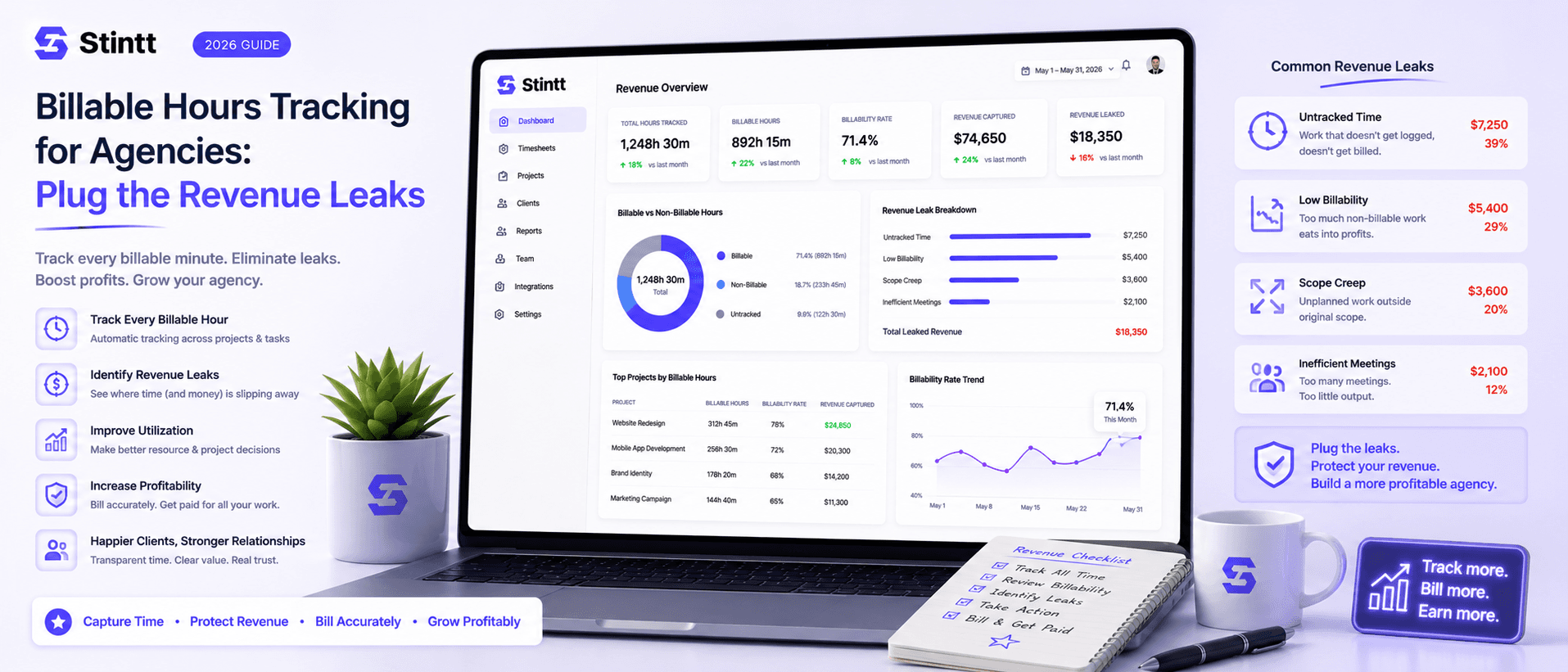
Billable Hours Tracking for Agencies: Plug the Revenue Leaks
Most agencies don't lose revenue on bad projects — they lose it on good ones, fifteen unbilled minutes at a time. When timesheets are filled in from memory on Friday, work you already delivered never reaches an invoice, and no report shows you the gap. This piece puts real numbers on the four ways billable hours leak, walks through the calendar-drafted, human-approved pipeline that plugs them, and is honest about the teams it doesn't suit.

Introducing Stintt v0.1: Your Calendar is Your Timesheet
We are thrilled to launch Stintt — the simplest way to turn your calendar events into accurate timesheets.